SearchLane
Blocked by robots.txt: How to Find and Fix It (+ Best Tips from Reddit)
What 'Blocked by robots.txt' and 'Indexed, though blocked' mean in Search Console, how to find the rule and fix it, and which Reddit tips are wrong.
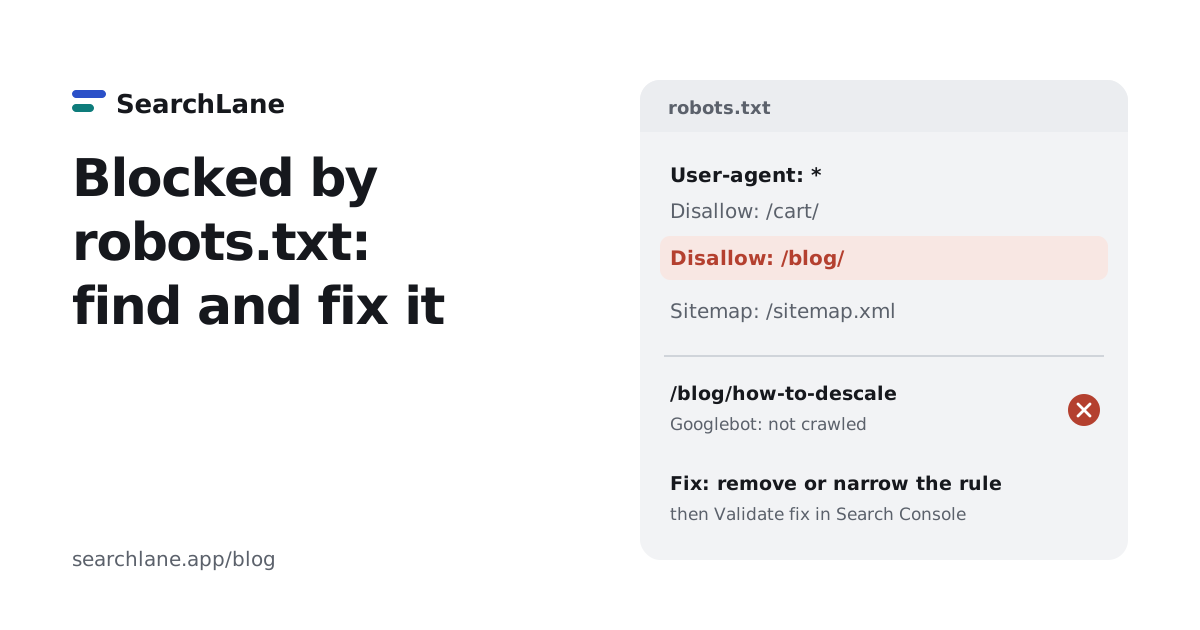
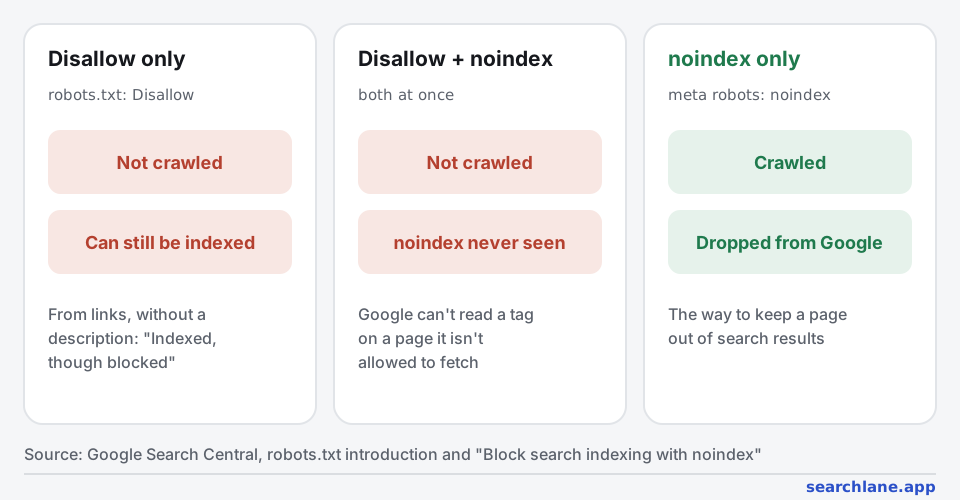
"Blocked by robots.txt" in Search Console means a Disallow rule in your robots.txt file stops Googlebot from crawling that URL. If the page should be in Google, find the rule that matches it and remove or narrow it, then click "Validate fix". If the page should stay out of Google, robots.txt is the wrong tool: let Google crawl it and add a noindex tag, because a blocked page can still be indexed from links.
What does "Blocked by robots.txt" mean?
Before crawling a page, Googlebot reads https://yoursite.com/robots.txt and checks whether a rule disallows that URL for it. If one does, Google doesn't fetch the page, so it can't read the content or rank it for what it says. Search Console lists such URLs in the Pages report under Why pages aren't indexed → Blocked by robots.txt.
That's not always a problem. Admin areas, carts, internal search results and endless filter combinations are often blocked on purpose. It's a problem when the list includes pages you want people to find. Among the sites our users checked with the SearchLane audit, 2 of 14 blocked crawlers from the whole site or large parts of it, and "Googlebot blocked in robots.txt" was the third most common top problem the extension found on single pages.
Blocked by robots.txt vs "Indexed, though blocked by robots.txt"
| Status in Search Console | What happened | What to do |
|---|---|---|
| Blocked by robots.txt | Google didn't crawl the URL and didn't index it | If the page should rank, allow it in robots.txt |
| Indexed, though blocked by robots.txt | Google didn't crawl the URL but indexed it anyway, from links pointing to it | If it should rank, allow it. If it shouldn't, allow crawling and add noindex |
The second status surprises people, but Google says it plainly: robots.txt manages crawling, it's not a way to keep a page out of Google. A blocked URL that other pages link to can appear in results without a description.
How do I find which rule blocks a page?
- Open the URL Inspection tool in Search Console and enter the page. If crawling is blocked, it says so.
- Open the robots.txt report (Settings → robots.txt) to see the file Google last fetched, when, and any errors. It replaced the old robots.txt Tester in 2023.
- Test the URL against the rules. The robots.txt checker shows, for Googlebot and AI crawlers, whether a URL is allowed and which exact line decides it.
- Check the group Googlebot actually uses. Googlebot follows only the most specific
User-agentgroup that matches it. If your file has aUser-agent: Googlebotgroup, the rules underUser-agent: *don't apply to Googlebot at all, and a forgottenDisallowthere can block the whole site.
How to fix "Blocked by robots.txt"
- Decide whether the page should be in Google. If not, see the next section; you don't need to change anything if the block is intended.
- Find the culprit. The usual ones:
Disallow: /left over from a staging site, a rule for a folder that now holds real pages, a wildcard likeDisallow: /*?that also matches pages with tracking parameters, or a plugin or CDN that rewrote the file. - Remove or narrow the rule. Block the exact folder or parameter you mean, and use
Allowfor exceptions. The robots.txt generator builds a clean file with common sections (admin, cart, search) blocked and everything else open. - Don't block CSS, JavaScript or APIs that pages need to render. Google needs them to see the page as visitors do.
- Make sure robots.txt itself loads. A 404 means "no rules", which is fine. A server error (5xx) makes Google pause crawling the site until it can read the file.
- Check the result and ask Google to recheck. Run the URL through the checker again, then in Search Console click "Validate fix" on the issue, or "Request indexing" in URL Inspection for a single page. Google caches robots.txt for up to 24 hours. To find every blocked page on the site at once, run the site audit.
While you're in the file, check AI crawlers too: a rule meant for training bots can also block ChatGPT search or Perplexity. See AI crawlers and robots.txt.
Robots.txt vs noindex: which one keeps a page out of Google?
Use noindex, either as <meta name="robots" content="noindex"> in the page or as an X-Robots-Tag: noindex HTTP header. For it to work, the page must not be blocked in robots.txt: Google has to crawl the page to see the tag (Google).
- To remove pages that are already indexed: unblock them, add
noindex, and wait until they drop out. For a few urgent URLs, the Removals tool in Search Console hides them for about six months while that happens. - After they're gone, you can block them in robots.txt again to save crawling on large sites. Keep in mind that a blocked URL with many links pointing to it can come back as "Indexed, though blocked".
- For private content, use a password. robots.txt is public and only polite bots follow it.
Can you use noindex in robots.txt?
No. A Noindex: line in robots.txt was never an official rule, and Google stopped supporting it on September 1, 2019, together with Nofollow and Crawl-delay. Today Google ignores such lines. To keep a page out of search, use one of these:
- a
<meta name="robots" content="noindex">tag in the page's<head>; - an
X-Robots-Tag: noindexHTTP header, which also works for PDFs and images; - a password, a 404 or a 410 for pages that shouldn't exist publicly.
Remember that the page must stay crawlable for Google to see the noindex.
What should you block in robots.txt?
On a small site, often nothing. A robots.txt with no Disallow rules, or no file at all, lets every crawler in, and that's a valid setup. On larger sites, block what wastes crawling and never needs to rank: admin and account areas, cart and checkout, internal search results, and filter or sorting combinations that create thousands of near-duplicate URLs. Always add a Sitemap: line pointing to your XML sitemap.
User-agent: *
Disallow: /wp-admin/
Allow: /wp-admin/admin-ajax.php
Disallow: /cart/
Disallow: /search
Disallow: /*?sort=

Sitemap: https://example.com/sitemap.xml
Best tips from Reddit: what 2 threads say (and what's outdated)
Reddit has surprisingly few threads that ask this question directly. We found two with real discussion, with 20 comments: a manager asking what to block, and a store with thousands of filter pages it wanted out of Google. The one tip both threads agree on is the most important one: robots.txt stops crawling, not indexing. Two other popular tips are now outdated.
| Tip from Reddit | Comments | Our verdict |
|---|---|---|
robots.txt doesn't remove pages from the index; use noindex and let Google crawl the page | 4 | ✅ True, and Google's documentation says the same |
Put noindex in robots.txt | 2 | ❌ Outdated. Google stopped supporting it in September 2019 |
| Tell Google which parameters to ignore in Search Console | 2 | ❌ Outdated. The URL Parameters tool was retired in 2022 |
| Once pages drop out, block them in robots.txt to save crawl budget | 1 | ⚠️ Fine on large sites; small sites don't need it |
| Use the Removals tool in Search Console to speed it up | 1 | ⚠️ Temporary: hides URLs for about six months |
Google prefers noindex these days | 1 | ⚠️ They do different jobs: noindex for indexing, robots.txt for crawling |
| If there's nothing to block, leave robots.txt empty | 1 | ✅ True |
| Block SEO tools' bots so competitors can't analyze your site | 1 | ⚠️ Only stops polite crawlers like AhrefsBot and SemrushBot; your rankings stay visible in Google itself |
Does blocking a page in robots.txt remove it from Google?
The store's filter pages had a noindex tag and were also blocked in robots.txt, so Google never saw the tag. The top answer: "blocking crawls will prevent googlebot from seeing the noindex tag" (r/TechSEO). A later reply spelled out the order that works: "stick a noindex on the page and remove anything from robots.txt blocking it… Once they are out of the index, then they need to add a robots.txt" rule. That matches Google's documentation.
Which Reddit tips no longer work?
The same thread's accepted answer recommended Search Console's URL Parameters tool. That was good advice in 2018, but Google retired the tool in 2022. Two other comments suggested a noindex line in robots.txt, citing "varied success". Google ended support for noindex, nofollow and crawl-delay in robots.txt on September 1, 2019, so today it has no effect at all.
What should a new site block?
The newcomer's question got a calm answer: "If you have nothing that needs disallowing, just leave it blank" (r/SEO). Another reply suggested blocking SEO tools so competitors can't analyze your content. That works only on crawlers that follow robots.txt, and it doesn't hide anything that's visible in Google's results.
How we counted
- Threads: Noindex & blocked in robots.txt (r/TechSEO, October 2018, 16 visible comments) and What content should be blocked by robots.txt? (r/SEO, January 2022, 4).
- We found them through Google results for robots.txt questions and read the pages saved on November 8, 2026. A long side argument about tone in the first thread isn't counted.
- Two threads is a small sample, and both are older. That's why the verdicts rely on Google's current documentation and announcements rather than on how many people agreed.
FAQ
How do I fix "Blocked by robots.txt" in Search Console?
Find the Disallow rule that matches the URL, using URL Inspection or a robots.txt checker. If the page should be in Google, remove or narrow that rule, then click "Validate fix" in the Pages report. If the page shouldn't be in Google, the block is fine as long as the page isn't indexed.
What does "Indexed, though blocked by robots.txt" mean?
Google indexed the URL without crawling it, because other pages link to it. It shows in results without a description. To get it out of Google, remove the robots.txt block and add a noindex tag, so Google can crawl the page and see the tag.
Does robots.txt prevent indexing?
No. robots.txt tells crawlers which URLs not to fetch. A blocked URL can still be indexed if it's linked from elsewhere. To keep a page out of search results, use a noindex meta tag or X-Robots-Tag header and leave the page crawlable.
What does "User-agent: * Disallow: /" mean?
It blocks the whole site for every crawler that follows robots.txt. User-agent: * means the rules apply to all bots, and Disallow: / matches every URL. It's common on staging sites and a frequent cause of "Blocked by robots.txt" after launch. An empty Disallow: line does the opposite and allows everything.
How long does a robots.txt change take to work?
Google usually caches robots.txt for up to 24 hours, so a change takes effect within a day. You can ask for a faster recheck in Search Console's robots.txt report. Pages that were blocked are then crawled again over the following days or weeks.
What does Reddit recommend for pages blocked by robots.txt?
In two Reddit threads with 20 comments, the advice that holds up is: robots.txt stops crawling, not indexing, so to remove pages, allow crawling and add noindex. Two other suggestions in the threads, noindex in robots.txt and the URL Parameters tool, no longer work.
Add SearchLane as a preferred source on GoogleSee our new articles more often in Top Stories and Google's AI answers. How it works