SearchLane
JavaScript SEO: Why Google and ChatGPT See an Empty Page (+ Best Tips from Reddit)
Why pages built with JavaScript go missing in Google and AI search, how to check what crawlers see, and how to fix it step by step.
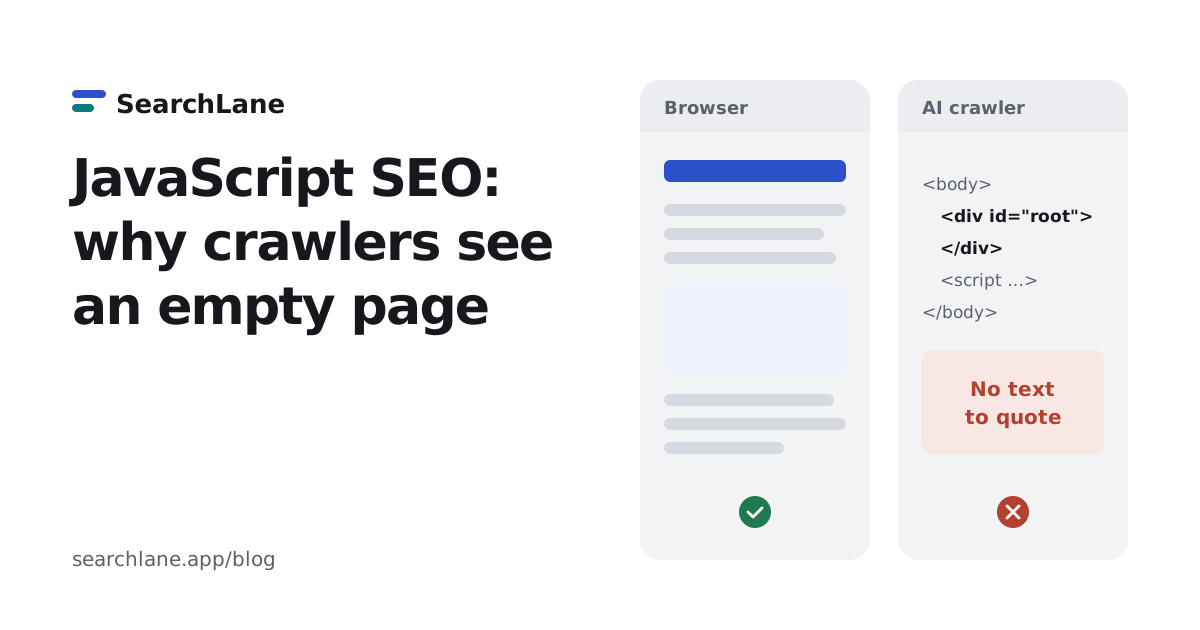
If your page's text only appears after JavaScript runs, Google sees it late and most AI crawlers don't see it at all. Google renders JavaScript in a second pass that can lag behind crawling, while the crawlers behind ChatGPT, Claude and Perplexity read only the HTML your server sends. The fix is to put the main text, links and meta tags in that first HTML response, with server-side rendering or static generation.
What is JavaScript SEO?
JavaScript SEO is making sure that search engines and AI crawlers can read pages that are built or changed by JavaScript. It matters for sites made with React, Vue, Angular and other frameworks that render in the browser, and for any site where a script loads the main text, prices, reviews or links after the page opens.
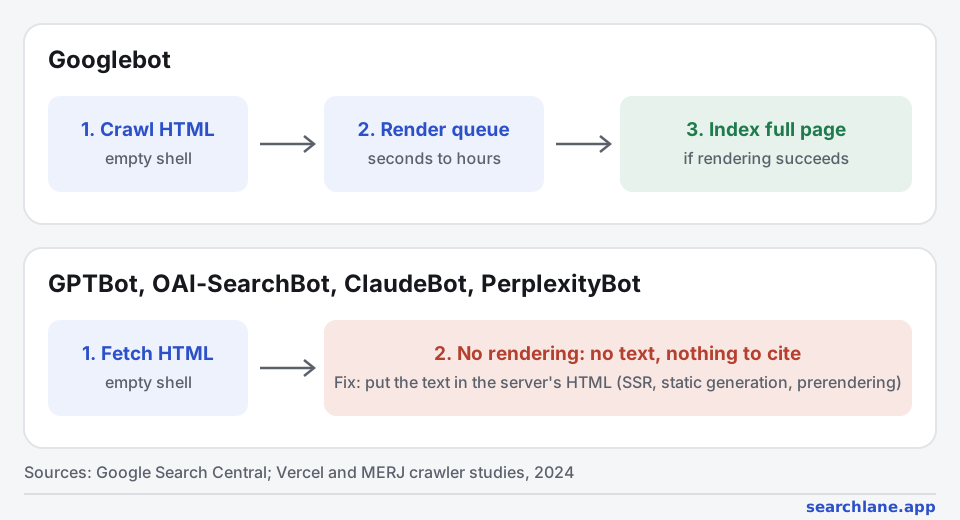
A browser downloads the HTML, runs the scripts and shows the finished page. A crawler downloads the same HTML, and then it depends on the crawler:
| Who reads the page | Runs JavaScript? | What it sees on a client-rendered page |
|---|---|---|
| Your visitors' browsers | Yes | The full page |
| Googlebot | Yes, in a second pass (Google) | The full page, after a delay; nothing if rendering fails |
| GPTBot, OAI-SearchBot, ChatGPT-User, ClaudeBot, PerplexityBot | No (Vercel, 2024) | Only the HTML from the server: often an empty <div id="root"> |
Does Google index JavaScript content?
Yes, but in two steps. Googlebot first crawls the HTML, then puts the page in a queue for rendering in a headless Chrome, and only after rendering does it see text and links added by scripts (Google Search Central). A study of over 100,000 Googlebot fetches by Vercel and MERJ found that Google did render every HTML page it crawled, half of them within 10 seconds, but some waited hours (Vercel, 2024).
So "Google can't read JavaScript" is a myth, but the second step still costs you:
- Links found only after rendering are discovered later. A new page linked only from a script-built menu waits for its parent to be rendered first.
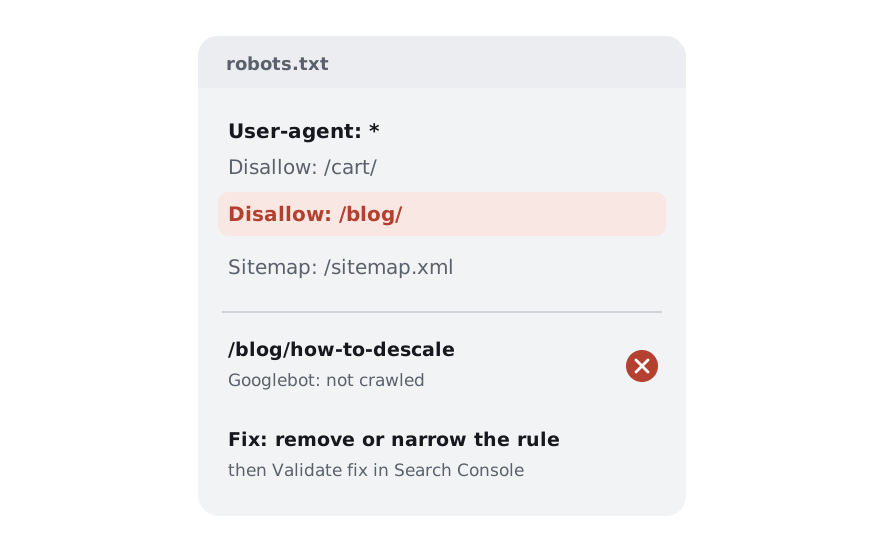
- Rendering can fail. A script that times out, a blocked API, a file disallowed in robots.txt or an error in an older browser API leaves Google with the empty shell.
- Meta tags changed by JavaScript can be ignored. Google reads
noindexfrom the first HTML: if the server sendsnoindexand a script removes it, the page may never be rendered (Google).
Can ChatGPT and other AI crawlers see JavaScript content?
Mostly no. Vercel analyzed hundreds of millions of AI crawler requests and found that none of the major ones, including OpenAI's, Anthropic's, Meta's, ByteDance's and Perplexity's, executed JavaScript: some downloaded script files but never ran them (Vercel, 2024). The exceptions are Google's Gemini, which uses Googlebot's infrastructure, and Applebot.
That means a client-rendered page can rank in Google and still be invisible to ChatGPT search, Claude and Perplexity: when they fetch it to answer a question, they get a page with no text to quote. Among the sites our users ran through the SearchLane audit, 4 of 14 had pages with text only after JavaScript, and it was the most common top problem the extension found on single pages.
Is React bad for SEO?
No, not anymore, and it never was React itself. A React app that renders only in the browser sends an HTML page with an empty <div id="root">: Google sees the content after rendering, and AI crawlers never see it. The same React components rendered on the server or at build time send full HTML, and search engines treat that page like any other.
- Next.js, Remix or React Router in framework mode render React on the server or at build time. Many large sites that rank well are built this way.
- A plain Vite or Create React App site is client-rendered by default. Add prerendering or move public pages to a framework that renders HTML.
- React Helmet and similar libraries set the title and meta tags with JavaScript. On a client-rendered app, AI crawlers don't see those tags either; on a server-rendered one they work.
So "Next.js vs React for SEO" is really "server-rendered vs client-rendered". The check below shows which one your site sends.
How to check if your page depends on JavaScript
- Compare the HTML with the page. Open the page, press Ctrl+U (Cmd+Option+U on a Mac) to see the source the server sent, and search for a sentence from the middle of the page. If it isn't there, crawlers that don't run JavaScript won't see it.
- Turn JavaScript off. In Chrome DevTools, open the command menu (Ctrl+Shift+P), type "Disable JavaScript" and reload. What's left is roughly what AI crawlers get.
- Use the URL Inspection tool in Search Console. "View crawled page" shows the HTML Google rendered and a screenshot. If text or links are missing there, Google doesn't see them either.
- Run a check that compares both versions. The Website SEO Checker extension compares the text in the server's HTML with the text in the finished page and shows what share of it crawlers get without JavaScript. The site audit flags every page whose HTML is almost empty.
How to fix JavaScript SEO issues
The goal is the same for every fix: the main text, internal links, title, meta description, canonical and structured data must be in the HTML the server sends.
- Render on the server or at build time. Server-side rendering (SSR) builds the HTML for each request, static site generation (SSG) builds it once at deploy. Frameworks do this for you: Next.js and Remix for React, Nuxt for Vue, SvelteKit, Astro, Angular with SSR. For pages that rarely change (articles, product pages, landing pages), static generation is the simplest and fastest.
- Prerender if you can't change the framework. A prerendering service or a build step that saves the rendered HTML of each route works for a single-page app that can't move to SSR soon. Google calls dynamic rendering, serving bots a different version than users, a workaround it doesn't recommend, so prerender the same page for everyone.
- Use real links. Navigation must be
<a href="/page">elements. Google doesn't follow links that only exist asonclickhandlers, and it ignores URLs after#(Google). - Put meta tags in the first HTML. Title, description, canonical and robots meta set by a script after load may be missed. Your framework's head or metadata API renders them on the server.
- Return real status codes. A single-page app that shows "Page not found" with a 200 status creates soft 404s. Return 404 from the server, or add
noindexfor missing routes. - Don't block scripts and APIs in robots.txt. If Googlebot can't fetch the JavaScript or the API the page needs, rendering fails. Check your file with the robots.txt checker.
- Check again after the fix. Repeat the source-code test and the URL Inspection test, then run the audit on the whole site: a template fix usually repairs every page built from it.
Best tips from Reddit: what 4 threads agree on (and what's a myth)
We read four Reddit threads about JavaScript SEO with 64 comments, two of them a React site owner asking why Google showed the site almost nowhere. The advice repeated most, in 18 comments, was the same as Google's: render the pages that should be found on the server. Below are all the tips that came up, each checked against the documentation and our data.
| Tip from Reddit | Comments | Our verdict |
|---|---|---|
| Render pages on the server: SSR, static generation, Astro, Next.js | 18 | ✅ True. Google recommends server or static rendering, and it's the only way AI crawlers see the text |
| Keep client-side rendering for logged-in parts, build the marketing site separately | 4 | ✅ True. Pages behind a login aren't indexed anyway |
| React and Next.js are bad for SEO, move to WordPress | 3 | ❌ Myth. The framework doesn't matter, the HTML it sends does; two other comments pointed to large Next.js sites that rank fine |
| Turn on JavaScript rendering in your crawler (Screaming Frog and similar) | 2 | ⚠️ Half right. Crawl with and without JavaScript: the difference is what AI crawlers miss |
| Prerender at build time instead of rewriting the app | 1 | ✅ Works for pages known at build time; rebuild when content changes |
| Serve Googlebot a special pre-rendered version from a Cloudflare Worker | 1 | ⚠️ Not recommended. Google calls dynamic rendering a workaround, and AI crawlers need the same HTML |
| Google renders JavaScript "sometimes weeks later" | 1 | ❌ Mostly a myth. Half of pages are rendered within seconds, though links found only after rendering are still discovered later |
| Use real links, not buttons | 1 | ✅ True. Google only follows <a href> links |
Do you need server-side rendering for SEO?
Every thread came back to it. One commenter put it as a rule: "Assume anything that is rendered client side is invisible to search engines" (r/TechSEO). For Google that's an exaggeration, since it does render JavaScript. For ChatGPT, Claude and Perplexity it's accurate: their crawlers read only the server's HTML (Vercel).
The suggested tools differed (Next.js, Astro, a multi-page site, WordPress), but the commenters who had shipped such sites agreed that the choice matters less than the result: "anything you want to be indexed (and more importantly, ranked) must be server side rendered. How that's achieved is up to you" (r/SEO). One reply described the result of moving a React app to Next.js with server rendering: the content became indexable and impressions rose within a couple of weeks (r/TechSEO).
Do you have to rewrite a React app?
The answer the React site owner thanked most was the one that didn't ask for a migration: keep the Vite app, add a prerendering step that saves each route as static HTML at build time, and submit a sitemap (r/SEO). This works when you know your URLs at build time, like the few dozen car listings in that thread. If pages change every hour, server rendering is the more reliable fix.
The same comment also suggested serving Googlebot a separately rendered version through a Cloudflare Worker. Google describes this as dynamic rendering, a workaround it no longer recommends, and a version made only for Googlebot does nothing for AI crawlers. If you prerender, serve the same HTML to everyone.
Does the whole app need server rendering?
Four comments made the same point from the other side: client-side rendering is fine for a dashboard behind a login. "Look around all major SaaS services you've ever heard of… they will have a separate dedicated marketing and docs website" (r/TechSEO). Google can't index pages that need a login, so only public pages need to be server-rendered.
Is the rendering delay seconds or weeks?
One comment claimed Google indexes the empty HTML first and renders the JavaScript "sometimes weeks later" (r/SEO). Another, from the author of a widely cited JavaScript SEO guide, answered that the delay "is a matter of seconds on average" (r/TechSEO). The data supports the second: in Vercel and MERJ's study of Googlebot, half of the pages were rendered within 10 seconds and most within minutes (Vercel). The real cost is discovery: links and pages that appear only after rendering are found later, and a rendering failure leaves Google with the empty shell.
Should you check View source or Inspect?
Commenters disagreed about how to check a page: some said to look at "View page source", others that it isn't what Google sees. Both are right about different crawlers. The page source is what AI crawlers get. The rendered HTML in Search Console's URL Inspection is what Google indexes. Check both, or use a tool that compares them, as described in how to check. As one commenter put it: "As developers we love to review our inputs, but we never look at our outputs. Review your rendered HTML" (r/TechSEO).
How we counted
- Threads: My React site had almost zero Google impressions (r/TechSEO, June 2026, 30 visible comments), the same question in r/SEO (June 2026, 13), Going into JS heavy sites - what to look out for? (r/TechSEO, June 2026, 13), Javascript SEO question (r/TechSEO, February 2024, 8).
- We found the threads through Google results for JavaScript SEO questions and read the pages saved on November 8, 2026: 64 visible comments, including replies.
- A comment counts toward a tip if it recommends that tip. One comment can count toward several tips. Comments off the topic, like a side conversation about a username, aren't counted.
- Every tip was checked against Google's documentation and the crawler studies linked above. Reddit isn't all site owners: four threads show what practitioners repeat, not how common each problem is.
FAQ
Is JavaScript bad for SEO?
No. JavaScript is bad for SEO only when the main content, links or meta tags exist only after it runs. A page that sends complete HTML from the server and adds interactivity with JavaScript is read by Google and AI crawlers like any static page.
Is Next.js better than React for SEO?
Next.js is React with server rendering and static generation built in, so its pages send full HTML by default. A plain React app renders in the browser unless you add prerendering. The SEO difference comes from that rendering mode, not from the library.
Do AI crawlers render JavaScript?
The main ones don't. Studies of crawler traffic found that OpenAI's, Anthropic's, Perplexity's, Meta's and ByteDance's crawlers read only the server's HTML. Gemini, which uses Googlebot's infrastructure, and Applebot do render pages.
How long does Google take to render JavaScript?
In a study of over 100,000 Googlebot fetches, half of the pages were rendered within 10 seconds of crawling, while a small share waited for hours. Rendering is usually fast, but links and content found only after it are discovered later than those in the HTML.
What does Reddit recommend for JavaScript SEO?
In four Reddit threads with 64 comments, the most repeated advice (18 comments) was to render pages that should be found on the server, with server-side rendering, static generation or prerendering. Commenters also advised keeping client-side rendering for logged-in parts of an app and using real links instead of buttons.
What is the difference between SSR and CSR?
With client-side rendering (CSR), the server sends a nearly empty HTML page and the browser builds the content with JavaScript. With server-side rendering (SSR), the server sends the finished HTML and JavaScript only adds interactivity. For search and AI crawlers, SSR or static generation is the safer choice.
Add SearchLane as a preferred source on GoogleSee our new articles more often in Top Stories and Google's AI answers. How it works