 SearchLane
Broken Links: How to Find and Fix Them (We Analyzed 4 Reddit Threads)
What broken links are, whether they hurt SEO, how to find and fix each kind, and which tools 25 people on Reddit use to find them.
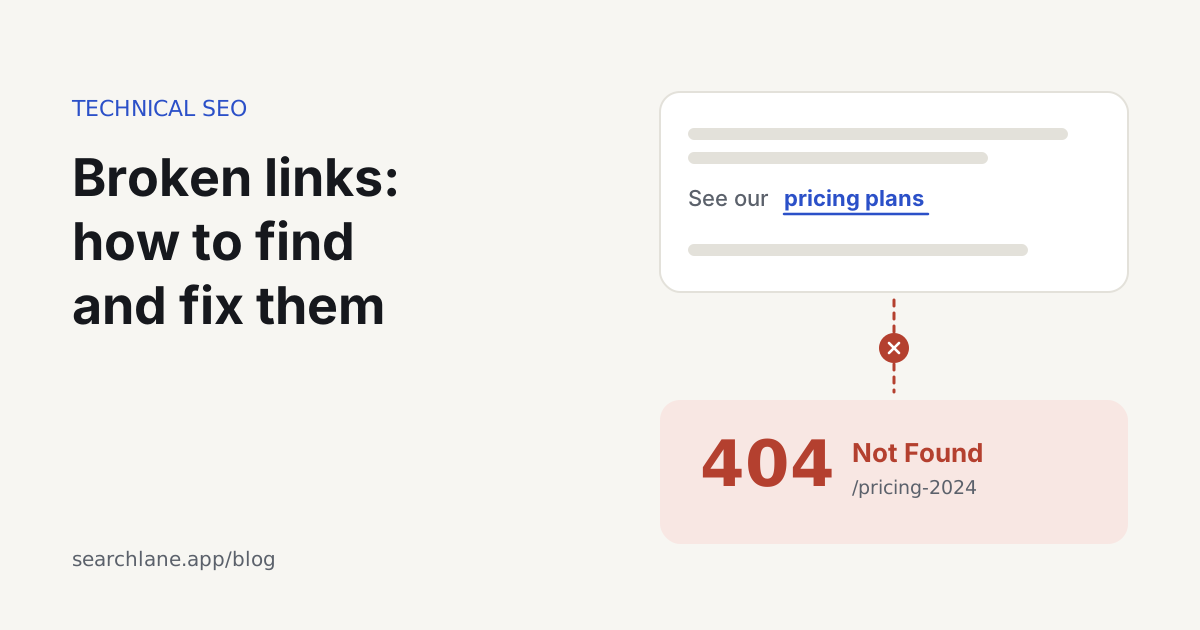
A broken link is a link to a page that doesn't load, most often because the server answers "404 Not Found". On your own site, you fix it by changing the link to the correct URL or by redirecting the old address to the page that replaced it. For links to other sites, link to a working source or remove the link. Google doesn't penalize a site for having broken links, but every one of them sends a visitor or a crawler to a dead end, and a backlink pointing at a deleted page passes its value to nothing.
What does "dead link" mean?
It means the same as broken link: the page the link points to no longer loads. When this happens gradually across the web, as pages move and sites shut down, people call it link rot. There is a lot of it. A Pew Research Center study based on pages sampled from Common Crawl found that 38% of web pages that existed in 2013 were gone ten years later. It also found at least one broken link on 23% of news pages and 21% of government pages.
For a site owner there are three kinds, and each has a different fix:
| Kind | Example | What to do |
|---|---|---|
| Broken internal link | Your menu links to /pricing-2024, which now returns 404 | Update the link on your page |
| Broken outbound link | An article of yours cites a study that has since moved | Link to the new location or another live source |
| Broken backlink | Another site links to a page you deleted | Redirect the old URL on your site |
A 404 isn't the only way a link breaks. The target can return 410 Gone or a 5xx server error, time out, sit on a domain that no longer exists, loop between redirects, or show a "page not found" message while still returning a normal 200 status. That last case is called a soft 404.
Is 404 a broken link?
Strictly speaking, no. A 404 is the server's response for a page that doesn't exist, and a broken link is a link that leads to one. The 404 is often the correct answer: if you deleted a page on purpose and have nothing to replace it, 404 or 410 is what the server should return.
Google says that 404 errors don't hurt a site's indexing or ranking, and that 404s for URLs that shouldn't exist can be ignored. The trouble comes from links to those URLs, either on your own pages or on other sites pointing at pages you removed without a redirect.
Do broken links hurt SEO?
Not through a penalty, but they do cost you:
- A backlink to a deleted page sends its value to an error page. Redirect the old URL to its replacement and that value counts again.
- Search engines and AI crawlers follow your internal links. A link to a dead URL is a wasted request, and a page that can only be reached through broken links may never be found.
- Visitors who hit an error tend to leave. On a product or pricing page, that can be a lost sale.
- Outbound links to sources that have disappeared make an article look abandoned, to readers and to AI systems deciding which pages to cite.
How to check a broken link in a website
- Crawl the site. A crawler follows every link and reports the ones that fail. Our free website audit checks up to 25 pages without sign-up. It lists pages with broken internal links (with the dead targets under each page), pages that return 4xx errors, internal links that go through redirects, and redirect chains.
- Look in Google Search Console. Under Indexing → Pages, the reason "Not found (404)" lists the URLs Google tried and failed to load. Inspect one of them to see the referring page where Google found the link.
- Go through your backlinks. Export the links pointing to your site (a backlink checker shows the strongest ones) and look for target URLs that now return errors. Those are the first redirects to add.
- Check outbound links from time to time. Our audit covers internal links only, so for links to other sites use a crawler that tests external URLs, or go through your most-visited articles by hand.
How to fix broken links
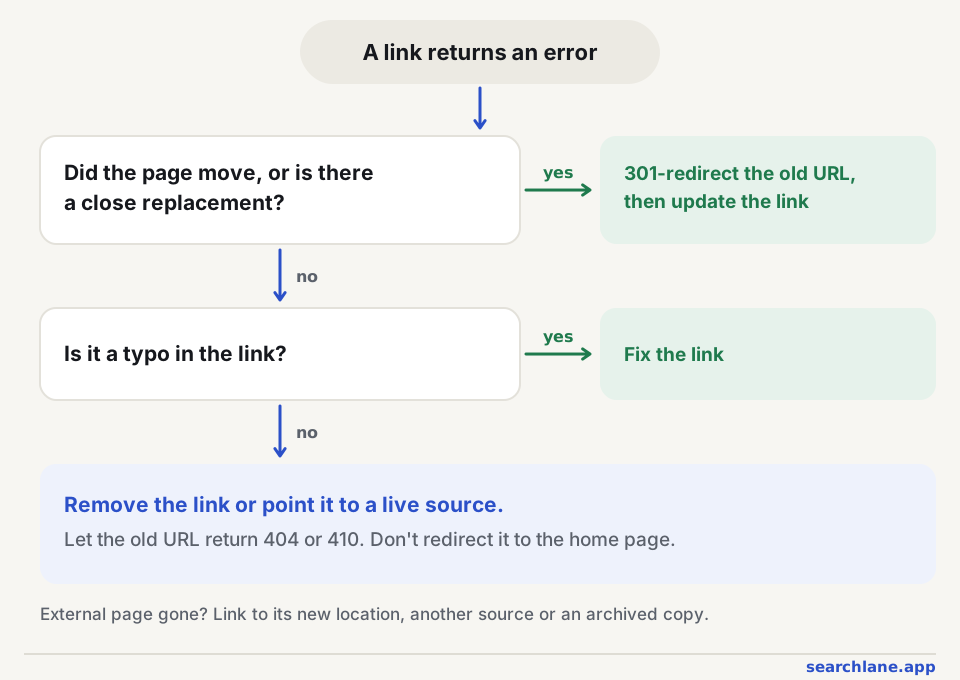
| What happened | Fix |
|---|---|
| The page moved to a new URL | 301-redirect the old URL to the new one, then point your internal links straight at the new URL. Google's guide to redirects covers the options |
| The page was deleted and a close replacement exists | 301-redirect to the replacement |
| The page was deleted and nothing similar exists | Remove or change the links to it, and let the URL return 404 or 410 |
| The link has a typo | Correct the link |
| An outbound link's page is gone | Link to the new location, another live source or an archived copy, or remove the link |
| A backlink has a typo in your URL | 301-redirect the misspelled URL to the right page if the link is worth keeping |
Two mistakes come up a lot. The first is redirecting every 404 to the home page. Google treats an unrelated redirect like that as a soft 404, so nothing is gained, and visitors who expected a specific page end up somewhere else. Only redirect to a page that serves the same purpose.
The second is leaving internal links pointing at redirects. The redirect keeps the visit, but it adds a hop for every visitor and every crawl. Change the link itself, and don't let redirects stack up into chains of two or more.
Which tools does Reddit use for broken links? We analyzed 4 threads
We read four r/SEO threads about broken links, from 2019 to 2024: 81 visible comments from 44 people.
Nobody argued for leaving broken links alone. All four people who answered "should I fix them?" said yes, and when the person asking wanted to know whether it would make a difference, the reply was: "If you want credit for those URLs by search engines, yes."
Twenty-five people named a tool for finding them. Screaming Frog SEO Spider came up most often, from 11 people (and two more whose accounts have since been deleted). Then came Xenu Link Sleuth, a free Windows tool that hasn't been updated in years (6), Google Search Console (4), Ahrefs and Semrush (3 each), and Moz, LinkMiner and brokenlinkcheck.com (2 each). The tool thread is from 2019, so newer tools don't appear in it.
The tips were more useful than the tool list:
- Check the templates first. "Sometimes its only 1 bad link that's in the footer, but since it's on every page crawlers see a ton of bad links" (r/SEO). The person asking had 1,400 broken links out of about 3,000, and later wrote that they had fixed them.
- Links reported as broken may work fine. In r/SEO, Semrush flagged more than 2,000 broken internal links on a food blog, and the first 20 the owner checked all opened fine. The explanation from the replies: "Firewalls are blocking semrush bot or rate limiting. That's why the numbers are inconsistent." The suggested fix was to allow the audit bot and add a crawl delay. Any crawler, ours included, reports pages that answer it with a 403 as errors, so check the response code before rewriting links.
- Search Console shows the 404s Google found, but "it can't tell you if they're due to internal links ... or external backlinks, which you'd need to set up redirects for" (r/SEO). That is why step 3 above uses a backlink checker.
- One commenter, writing in Russian, suggested server logs: they show the 404s real visitors hit, including old addresses whose redirects stopped working.
How we counted
We found the threads through Google (site:reddit.com searches on the topic) and saved them on October 10, 2026, with every visible comment. We counted people, not comments: each person once per thread, by the position they took. We didn't count the thread's author, replies that only asked a question or made a joke, or four replies that promoted a product or service. An AI model sorted the replies into positions, and we checked each label against the reply itself. Removed and deleted comments aren't included. People who answer on Reddit aren't a random sample of site owners, so read the shares as the mood among practitioners, not as a survey.
The threads:
- Should I fix my broken links?, r/SEO, January 2024
- Site Audit Support - "broken internal links" are NOT actually broken, r/SEO, May 2024
- Can someone recommend me a tool for finding broken links?, r/SEO, April 2019
- Broken links: How to find them and what will happen if you don't fix dead 404 pages?, r/SEO, July 2021
Our analysis: what the documentation and data say
| What people said | What the documentation or data shows | Verdict |
|---|---|---|
| Fix every broken link | Google says 404 errors don't hurt indexing or ranking, and that 404s for URLs that shouldn't exist can be ignored | Partly: fix broken internal links and redirect deleted pages that have backlinks. The 404 itself is fine |
| Don't trust a tool's health score | Health scores are each tool's own formula, not something Google uses. Search Console's Page indexing report shows the URLs Google actually failed to load | True |
| Some "broken" links actually work | A firewall or CDN that answers a crawler with 403 makes any audit tool report an error, while the page opens fine in a browser | True: check the status code and which crawler got it before changing links |
| Search Console can't say where a 404 is linked from | URL Inspection shows the referring page where Google found a URL, though not for every URL, and it doesn't list backlinks | Partly true: use a crawler for internal links and a backlink checker for links from other sites |
What we recommend: crawl the site monthly, start with links in templates such as the header and footer, redirect deleted pages that still get backlinks, and leave genuine 404s for pages that are gone on purpose.
What are some examples of broken links?
- A menu or footer link left over from a redesign.
- A product page removed when the item was discontinued.
- A blog post whose URL changed when someone edited the title.
- Links that still point to
http://or to the old domain after a migration. - A typo in the link, like
/prcinginstead of/pricing. - An image, PDF or download that was deleted from the server.
- A link to a study, tool or news story that the other site moved or took down.
- An anchor link like
#setuppointing to a heading that no longer exists.
How often to check for broken links
Once a month is enough for most sites. Always check after a redesign, a migration, a change to the URL structure or a big content clean-up, because that is when most broken links appear. Large sites and online shops whose stock changes often do better with a weekly crawl.
FAQ
What is the difference between 404 and 410?
Both mean the page isn't there. 404 Not Found doesn't say why. 410 Gone says the page was removed on purpose and won't come back. Google treats them almost the same, although a 410 can drop a URL from the index a little sooner.
Should I redirect every 404 to the home page?
No. Redirect a dead URL only to a page that serves the same purpose. Google treats mass redirects to the home page as soft 404s, and they confuse visitors. When there is no good match, a helpful 404 page with search and links to the main sections works better.
Do broken outbound links hurt SEO?
Not directly. They do make a page look neglected and send readers nowhere. Fix them on your most important pages first, especially articles you'd like AI answers to cite, since sources that no longer exist make a page weaker as evidence.
How many broken links is too many?
On your own site, aim for no broken internal links at all. Each one takes a few minutes to fix. A few dead outbound links on old articles are normal; start with the pages that get traffic or links.
What is the best broken link checker, according to Reddit?
Screaming Frog SEO Spider. In four r/SEO threads we analyzed, it was named by 11 of the 25 people who recommended a tool, ahead of Xenu Link Sleuth (6) and Google Search Console (4). Its free version crawls up to 500 URLs. For links from other sites to your deleted pages, commenters used backlink checkers such as Ahrefs, Semrush or Moz.